
So if you're like me and you switch back and forth between Apple IDs in the AppStore, perhaps to download an app that your friend purchased and you don't want to have to purchase it on your account, you hate always being prompted to input an e-mail and password. Well now with AccountChanger, you don't have to be bothered to enter that information every time you switch accounts.
AccountChanger is a tweak found in Cydia's BigBoss repo that allows you to switch between any accounts you've ever logged into in the AppStore on your iDevice. Until the session has expired for that account(it is unknown how long a session will last), you will never be asked to enter the Apple ID e-mail or password for any account you've logged into on that specific device.
How does it work? Once you've installed AccountChanger, a button named "Accounts" is added to the Updates section of the AppStore. By tapping on that button, a dropdown menu will appear where you can scroll through and select the account you want to login in to.
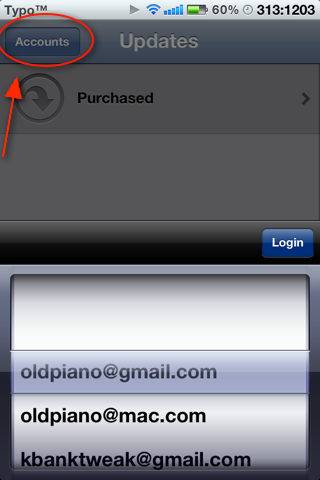
Package Name: AccountChanger
Description: Switch back and forth between AppStore accounts easily.
Repository: BigBoss
Price: Free

No comments:
Post a Comment